
- Affan Waseem
- Blog
Amazon ASIN Suspension: A Guide For Appeal and Reinstatement
You check Manage Inventory and notice something is wrong. Your product is no longer visible, your listing shows as inactive, or Amazon has removed the detail page completely.
Many sellers use the term Amazon ASIN suspension to describe all these situations, but not every listing issue is an actual suspension. Amazon uses different statuses depending on the reason behind the restriction, and the correct solution depends on identifying what happened first.
A suppressed listing may only require a content update. A blocked ASIN may require a complete appeal with supporting documents. Responding with the wrong approach can delay reinstatement or result in repeated appeal rejections.
This guide explains what an Amazon ASIN suspension means, why ASINs get restricted, how different listing statuses work, what documents Amazon may require, and how to create an effective reinstatement appeal.
What Is an Amazon ASIN Suspension?
An Amazon ASIN suspension means Amazon has restricted a specific product listing because of a policy violation, intellectual property concern, safety issue, restricted product problem, or poor customer experience signals.
Unlike an account suspension, an ASIN-level action usually affects only one product listing. However, repeated ASIN issues or serious violations can impact your overall Account Health and may lead to broader seller account review.
It is important to note that Amazon does not officially use “ASIN suspension” as a single universal status. Sellers commonly use this term when Amazon blocks, removes, or restricts a specific product listing.
An ASIN-level restriction means the affected product can no longer be purchased normally until the underlying issue is resolved. The action may happen because of:
- Policy violations
- Intellectual property complaints
- Product safety concerns
- Restricted product violations
- Listing accuracy problems
- Customer experience issues
The exact action Amazon takes depends on the severity and type of violation.
ASIN Suspension vs. Account Suspension
An ASIN-level action affects one listing. Your other products keep selling normally. An account-level action, such as a suspension under Section 3 of the Amazon Business Solutions Agreement, affects your selling privileges across your entire account. Our guide to Amazon Section 3 violations covers that broader situation in detail.
These two levels are connected. A single ASIN suspension usually stays contained to that one listing. But repeated ASIN suspensions, or one serious enough case, such as a confirmed safety issue or a pattern of policy violations, can pull your Account Health Rating down and lead to an account-level review. This is not automatic, and one suspended listing rarely causes an account suspension on its own. It is still a real pattern worth taking seriously if you already have more than one open issue.
The Different ASIN Statuses: ASIN Suspension vs Listing Suppression vs Removal
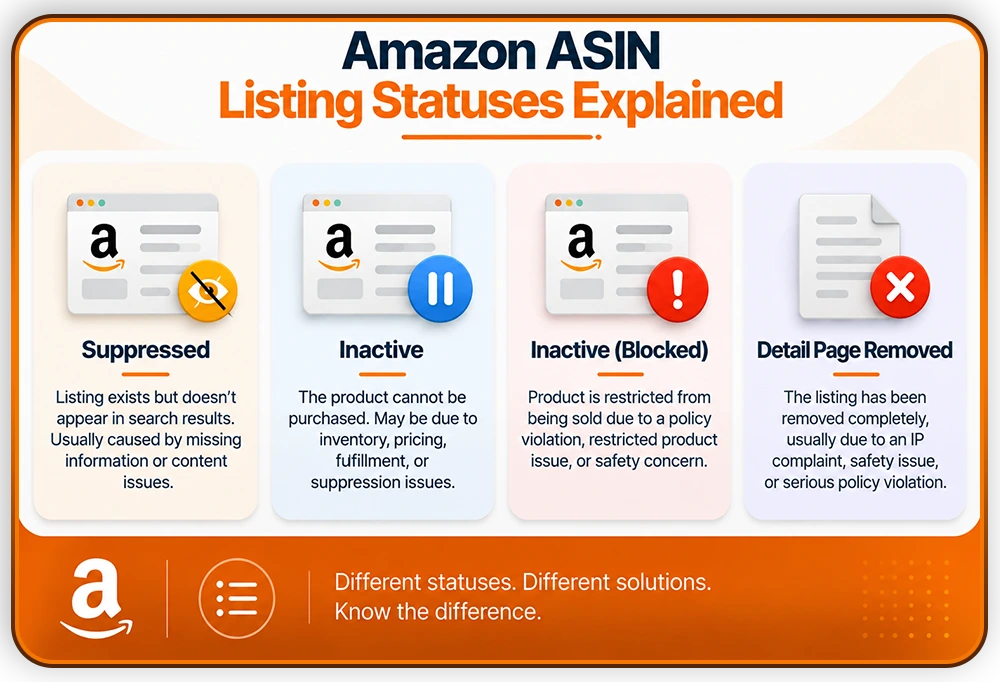
Sellers often use the word “suspended” to describe several different things. Seller Central actually shows more specific statuses, and knowing which one applies to your listing changes what you need to do next.
- Suppressed: The listing still exists and looks normal in your inventory, but it does not appear in search results. This is usually caused by a content or compliance gap, such as missing images, incomplete product attributes, or a prohibited word in the title.
- Inactive: A broader status meaning the ASIN cannot be purchased. This can happen because of suppression, but also because of stranded inventory, fulfillment problems, or a pricing error that has nothing to do with a policy violation.
- Inactive (Blocked): This is closest to what most sellers mean when they say their ASIN was suspended. It is tied to a policy violation, a restricted or prohibited product issue, or a product recall.
- Detail Page Removed: The most serious status. Amazon has removed the listing completely, usually for an intellectual property claim, a safety issue, or a violation connected to your account health.
Checking the exact status in Manage Inventory before deciding on a response matters, because a suppressed listing and a blocked listing need completely different fixes. A suppressed listing often just needs the missing field corrected. A blocked listing usually needs a full appeal with supporting evidence.
What Causes an Amazon ASIN Suspension?
Most ASIN suspensions trace back to a small number of common causes.
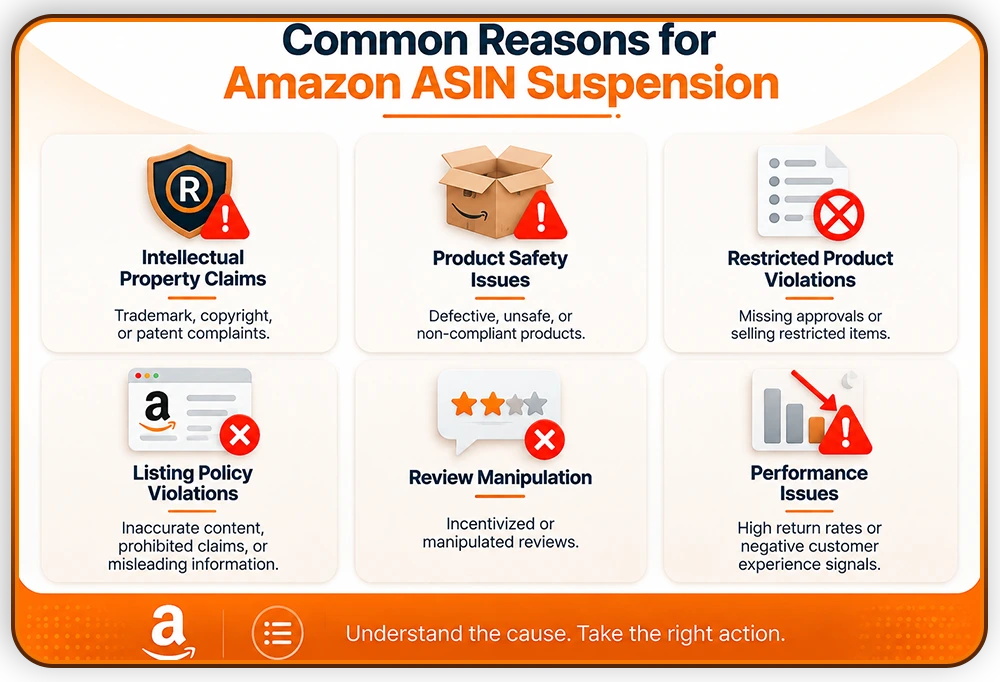
1. Intellectual property claims: A trademark, copyright, or patent complaint tied to that specific listing
2. Product safety or condition complaints: A customer report of damage, a defect, or a safety concern. Our guide to product safety complaints on Amazon covers this cause in more depth, including the documentation Amazon typically asks for.
3. Duplicate ASIN creation: Amazon’s system detects that a new listing matches an existing one by brand, manufacturer part number, or barcode, and suppresses the newer one to avoid confusing customers.
4. Restricted or prohibited product issues: The product needs approval that was never obtained, or falls into a category Amazon does not allow. Our guide to Amazon’s restricted product categories explains how to check this before it becomes a problem.
5. Listing policy violations: Prohibited keywords, non-compliant images, or an inaccurate category classification.
6. Performance-based suppression: A high rate of negative customer experience reports, visible in the Voice of the Customer dashboard inside Seller Central.
How Do You Check If Your ASIN Is Suspended?
Following a consistent process here saves time and avoids guessing at a cause that may not be correct.
- Check Manage Inventory: Go to Inventory, then Manage All Inventory, then Search Suppressed and Inactive Listings. This shows the exact status of every affected ASIN, not just whether it is selling.
- Check Voice of the Customer: Found under the Performance tab. This is where performance-based suppressions and their specific cause are usually shown.
- Check Performance Notifications: This is where the formal violation notice will appear if the suspension is tied to a policy issue, an IP claim, or a safety complaint.
- Read the notice fully before responding: The notice usually states the specific reason and what Amazon needs to see in order to reinstate the listing.
How to Appeal an Amazon ASIN Suspension
An Amazon ASIN appeal generally needs to answer three questions, in this order: what actually caused the suspension, what has already been fixed, and what will stop it from happening again. This structure applies across nearly every type of Amazon suspension, and our full guide to the Amazon Plan of Action walks through the format in detail with a complete worked example. What follows here focuses on what is different when the issue is tied to one ASIN rather than the whole account.
Confirm the Real Cause of ASIN Suspension Before Writing Anything
Re-read the notice carefully. Sellers under pressure often respond to what they assume caused the suspension rather than what Amazon actually stated. This single mistake is one of the most common reasons an ASIN appeal fails on the first attempt. If the notice does not clearly state the reason, check Voice of the Customer and Performance Notifications together, since the full explanation is sometimes split across both.
Gather the Right Documentation for the Specific Cause
The documents needed depend entirely on why the ASIN was suspended, so match the evidence to the actual notice rather than sending a general set of files.
- Intellectual property claims: For intellectual property complaints, Amazon may request documents that prove legitimate sourcing and ownership rights. These may include supplier invoices, purchase orders, authorization letters, brand permission documents, or other proof that the product was obtained through an authorized source. These documents should clearly show important details such as supplier information, product details, purchase dates, and purchased quantities.
- Product safety or condition complaints: For product safety issues, Amazon may require documentation that verifies the product meets applicable safety standards. Depending on the product category, this may include laboratory test reports, compliance certificates, safety documentation, product manuals, or quality control records.
- Restricted or prohibited product issues: For restricted product issues, sellers may need to provide documentation proving that the product meets Amazon’s category requirements. This can include category approval documents, required certifications, compliance records, or product authorization documents.
- Duplicate ASIN issues: For duplicate ASIN issues, sellers may need to provide evidence showing why the products are different or why the listing should be corrected. Supporting evidence may include product specifications, packaging differences, manufacturer information, and images that clearly show product variations.
- Performance-based suppression: For performance-based ASIN restrictions, sellers should provide evidence that demonstrates improvements in product quality and customer experience. This may include quality inspection records, supplier corrective actions, updated operational processes, and customer complaint analysis.
Write the Plan of Action With Specific Details
A strong Plan of Action for an ASIN-level suspension has three parts.
Root Cause: State exactly what happened, using specific details rather than general language. Naming the exact listing element, document, or process that caused the issue is far more convincing than a general statement that something went wrong.
Corrective Action: Describe what has already been done, written in the past tense, with proof attached. This might mean correcting a listing detail, replacing a supplier, or completing a missing certification.
Prevention: Describe a process that would catch the same issue again in the future, not just a promise that it will not happen. A checklist, a review step, or a scheduled audit, with someone responsible for it, is much stronger than a single sentence saying the problem is fixed.
A generic appeal that could apply to any seller’s listing is one of the most common reasons these appeals get rejected. Our guide on why Amazon appeals get rejected explains this pattern in more detail and is worth reading before you submit.
Submit Through the Correct Channel
For a formal policy, IP, or safety violation, submit your appeal through the case tied to the original notice in Seller Central. For a performance-based suppression shown in Voice of the Customer, use the Resolve Issue option within that dashboard instead, since this uses a separate process from a standard appeal.
What to Do If the First Appeal Is Rejected
A rejected appeal usually means something specific was missing or unclear, not that the case is unwinnable. Read the rejection carefully for any specific reason given. Resubmitting the same appeal with only small wording changes rarely produces a different result and can make the case look weaker over time. Instead, identify exactly what was missing or unconvincing, and address that gap directly in the next submission with new evidence rather than new phrasing.
Amazon ASIN Reinstatement: What to Expect
There is no single published timeline for Amazon ASIN reinstatement, and it varies by the type of suspension and how complete the appeal is. Some suppressed listings resolve on their own once the missing field is corrected, sometimes within a day. A suspension tied to a policy violation, an IP claim, or a safety issue generally requires a full appeal and can take longer, particularly if more than one round of appeal is needed.
If several appeals have been rejected with no clear explanation, or the notice states that no further appeal will be reviewed, that is a signal to reconsider the approach rather than resubmitting again. At that point, a fresh review of the case, or legal advice for cases involving intellectual property or safety claims with real legal exposure, is usually more useful than another round of the same appeal.
How to Prevent Future Amazon ASIN Suspensions
Preventing ASIN suspensions takes more than reacting after a listing goes down. A few consistent habits reduce the risk significantly.
- Audit new listings before publishing: Check for duplicate matches against existing ASINs, and review the title, bullets, and images for prohibited content before the listing goes live.
- Keep documentation current for every listing: Invoices, authorization letters, and required certifications should be ready before Amazon asks for them, not gathered afterward under time pressure.
- Check restricted category requirements early: Confirm whether a product needs approval before sourcing inventory, not after a listing gets flagged.
- Monitor Voice of the Customer regularly: Checking this weekly, rather than only after a suspension, catches performance-based risk while it is still small.
- Review backend search terms, not just visible content: Prohibited or brand-related terms in backend fields can trigger the same issues as visible listing text, and sellers often overlook them.
- Confirm supplier authorization in writing: Especially for branded or IP-sensitive products, since this documentation is the single most requested item in IP-related appeals.
- Do not assume every sales drop is a suspension: Confirm the actual status in Manage Inventory first, since the cause is sometimes unrelated to a policy issue and has a much simpler fix.
Amazon ASIN Reinstatement Service
An Amazon ASIN restriction is not solved by submitting a generic appeal. The correct approach starts with identifying the exact reason Amazon took action, gathering the right documentation, and creating a clear corrective plan.
Whether the issue involves intellectual property, product safety, listing compliance, or customer experience, successful reinstatement depends on showing Amazon that the original problem has been fixed and that reliable processes are in place to prevent it from happening again.
Back to Selling’s Amazon ASIN reinstatement service helps sellers analyze ASIN restrictions, identify the root cause, prepare evidence-based appeals, and build reinstatement strategies designed around Amazon’s requirements.

Frequently Asked Questions
What does it mean when an Amazon ASIN is suspended?
It means Amazon has removed or blocked one specific product listing, usually because of a policy violation, an intellectual property claim, a safety complaint, or a quality issue. A single ASIN suspension does not, by itself, affect the rest of your account or your other listings.
What is the difference between a suppressed listing and a suspended ASIN?
A suppressed listing still exists but does not show up in search results, usually because of a content or compliance gap. A suspended or blocked ASIN has been removed from sale entirely and generally needs a full appeal rather than a simple content fix.
How do I know if my Amazon ASIN was suspended?
Check Manage Inventory under the Inventory tab, and look at the specific status shown for the listing. Also check Voice of the Customer and Performance Notifications, since the full explanation is sometimes shown across more than one place.
Can an ASIN suspension lead to an account suspension?
It can, though it is not automatic. A single ASIN suspension usually stays limited to that listing. Repeated suspensions, or one serious issue such as a confirmed safety problem, can affect your Account Health Rating and lead to a broader account-level review.
How long does Amazon ASIN reinstatement take?
Amazon does not publish a fixed timeline. Some content-based suppressions resolve within a day once the issue is corrected. Suspensions tied to a formal violation generally take longer, especially if more than one appeal is needed before Amazon accepts it.