
- Kevin Paul
- Blog
Amazon Restricted Products: What You Can and Can't Sell
A seller finds a promising product, orders inventory, and only at listing time discovers the item needs approval, or worse, can’t be sold on Amazon at all. That gap between sourcing and listing is where a lot of money gets lost. Part of the confusion is the vocabulary itself: “restricted” doesn’t mean “banned,” and treating the two as the same thing is what leads sellers to buy inventory they can’t move. The fix isn’t complicated, but it does mean checking a product’s status before the purchase order goes out, not after the boxes arrive. Here’s how the tiers actually work, and how to check before you commit to a product.
Can You Sell Any Product on Amazon?
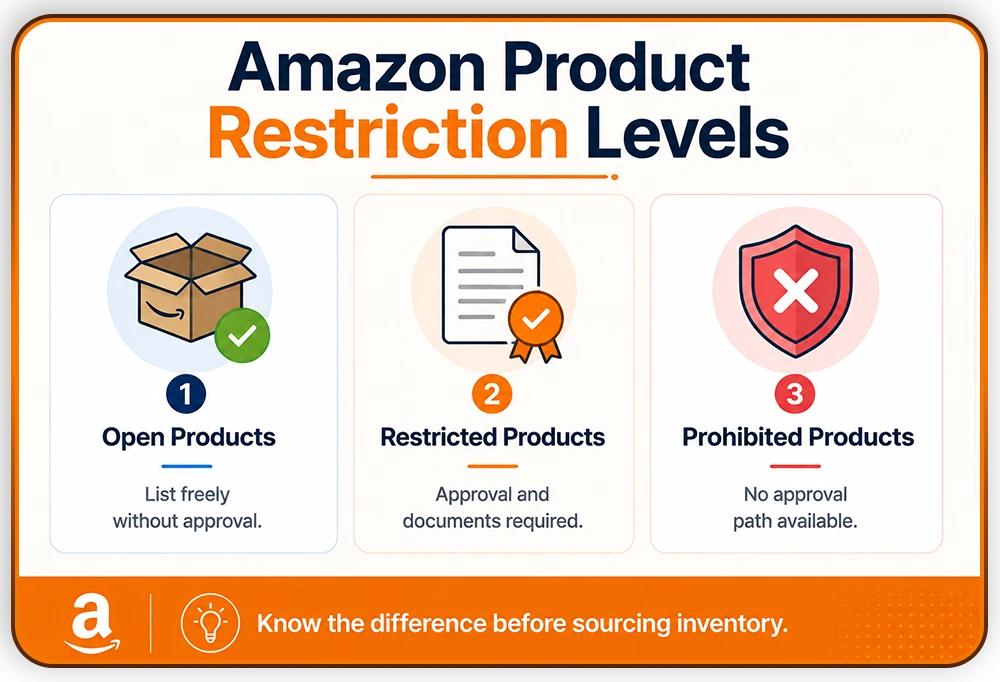
No, not every product can be listed freely. Amazon splits products into three tiers: open, meaning you can list without approval; restricted or gated, meaning you need Amazon’s sign-off first; and prohibited, meaning there’s no approval path at all. Amazon restricted products sit in that middle category, and knowing which tier a product falls into before you source it, not after, is what separates a normal listing process from a stalled one.
The three tiers matter because they call for different actions. An open product just needs a listing. A restricted product needs an application and documentation before it can go live. A prohibited product needs to be crossed off the list entirely, no matter how good the margins look on paper.
What Does “Restricted” Mean on Amazon Seller Central?
Restricted means permission is required, not permanently banned. That’s the key distinction from prohibited: a restricted product can become sellable once Amazon approves your application, while a prohibited product never can, regardless of what you submit.
Products typically end up restricted for one of two reasons. The first is safety or legal risk, which covers things like hazmat items and age-restricted goods. The second is quality or authenticity concern, which covers categories with a history of counterfeits or misrepresentation, such as collectibles, fine art, and luxury goods.
Restrictions can also apply at different levels. A whole category might be gated, or just a subcategory within it, or a specific brand or ASIN inside an otherwise open category. That’s why two products that look nearly identical can have completely different approval statuses in Seller Central, and why checking status product by product matters more than checking status by category alone.
This layered structure is also why a seller can be approved to sell one item from a brand and still get blocked on another item from the same brand. Amazon’s gating logic runs at whatever level the risk actually sits at, whether that’s the whole category, a subcategory, or one specific ASIN, so approval at a higher level doesn’t automatically carry down to everything beneath it.
Amazon Restricted Categories
The following are examples of categories where restrictions commonly apply, not an exhaustive list:
- Beauty and personal care: certain skincare and cosmetic ingredients require compliance documentation before a listing goes live.
- Dietary supplements and health products: these carry labeling requirements and often need safety certification.
- Grocery and food: expiration dating and handling requirements apply, and enforcement here tends to be strict.
- Jewelry and collectibles: authenticity documentation is commonly required, particularly for fine art and collectible coins.
- Automotive parts: safety-critical parts, brakes being the clearest example, need certification before they can be listed..
- Electronics: some subcategories are tied to safety or energy compliance standards.
Category status changes without notice. Amazon periodically tightens or loosens gating on a category in response to complaint volume, regulatory changes, or seasonal risk (holiday electronics and certain grocery items, for example, see extra scrutiny around peak shopping periods). Verify the current status in Seller Central before sourcing inventory. See the Amazon restricted products list for more details.
What About Restricted Brands?
Brand-level restrictions are separate from category and product restrictions, and they catch a lot of sellers off guard. A category can be completely open, and a specific brand within it can still be gated.
Amazon doesn’t publish an official list of restricted brands. In practice, many well-known brands may have additional selling restrictions depending on the product, marketplace, and seller account. The pattern holds broadly: the more recognizable the brand, the more likely it’s restricted, since brand gating exists largely to control counterfeit risk on products that counterfeiters target most.
Brand restrictions are typically checked by searching the brand or ASIN in Seller Central before sourcing inventory. Usually, you’ll need a license or some kind of formal authorization to sell branded products. If you’re sourcing branded inventory, ensure this step before committing to a purchase order, not after.
Why Are Some Items Restricted to Sell on Amazon?
A few recurring reasons explain why Amazon has imposed restrictions on certain categories:
- Consumer safety: counterfeit or unsafe goods have caused real harm, and Amazon gates categories with that history to reduce the chance of it happening again.
- Legal compliance: some products are regulated by federal, state, or local law, and Amazon's gating reflects that regulation rather than an internal policy choice.
- Brand and authenticity protection:categories with high counterfeit rates, watches and designer accessories among them, get extra scrutiny to protect both the brand owners and the buyers purchasing under that brand name.
- Amazon's own quality standards: for some product types, Amazon applies requirements that go beyond what the law strictly demands, largely to keep return and complaint rates down across the category.
None of these reasons are unique to Amazon. Most retailers apply some version of the same logic to hazardous, regulated, or easily counterfeited goods. What’s different about Amazon is the scale: a gating decision made for one category applies uniformly across millions of sellers and listings at once, which is part of why enforcement can feel abrupt from an individual seller’s side even when the underlying policy has been in place for a while.
Amazon Banned Items and Prohibited Products
Prohibited means no approval path exists, ever, regardless of what documentation you provide. This is the hard line, and it’s worth being clear about because sellers sometimes assume enough paperwork can unlock anything.
Examples that are consistently prohibited across Amazon’s policies include illegal drugs and drug-related tools or equipment, tobacco, cigarettes, vapes, counterfeit currency, recalled products, and hazardous or explosive materials like fireworks.
The contrast with restricted is straightforward: a restricted product becomes sellable after approval. A prohibited product doesn’t, no matter what’s submitted or how the application is framed.
FBA Prohibited Products
There’s an important distinction that trips up a lot of sellers: a product can be sellable on Amazon generally but still barred from Fulfillment by Amazon specifically. These include items such as alcoholic beverages (including non-alcoholic beer), vehicle tires, gift cards, etc.
If FBA isn’t an option for a given product, then you can use the other option called Merchant Fulfilled Network, meaning you fulfill it yourself. This matters most for sellers who source hazmat-adjacent products such as loose batteries, since it’s possible to be fully approved to list an item and still have Amazon decline to warehouse and ship it for you. Check Amazon’s dangerous goods identification guide before sending your products to fulfillment centers, because Amazon might dispose of your goods without reimbursement.
Don’t assume that general category approval covers FBA eligibility. Check the separate FBA restricted products list in Seller Central rather than extrapolating from your category-level approval status, and confirm FBA eligibility before sending inventory into a fulfillment center, not after it’s already been shipped and rejected.
What Are Age-Restricted Items on Amazon?
Age-restricted generally refers to items tied to legal purchase-age requirements. On Amazon US, alcohol sales are limited and generally require approval and licensing. The age restriction rules for products may vary based on the region or country.
This is where general retail intuition can mislead sellers. Categories that are treated as merely age-restricted in typical retail, tobacco and vapes being the clearest examples, are prohibited outright on Amazon in the US rather than gated. There’s no age-verification workaround that unlocks them.
Because Amazon’s policy and state or federal law don’t always line up one-to-one, check the specific category page in Seller Central rather than assuming based on general retail age laws.
How Do You Check If a Product Is Restricted on Amazon?
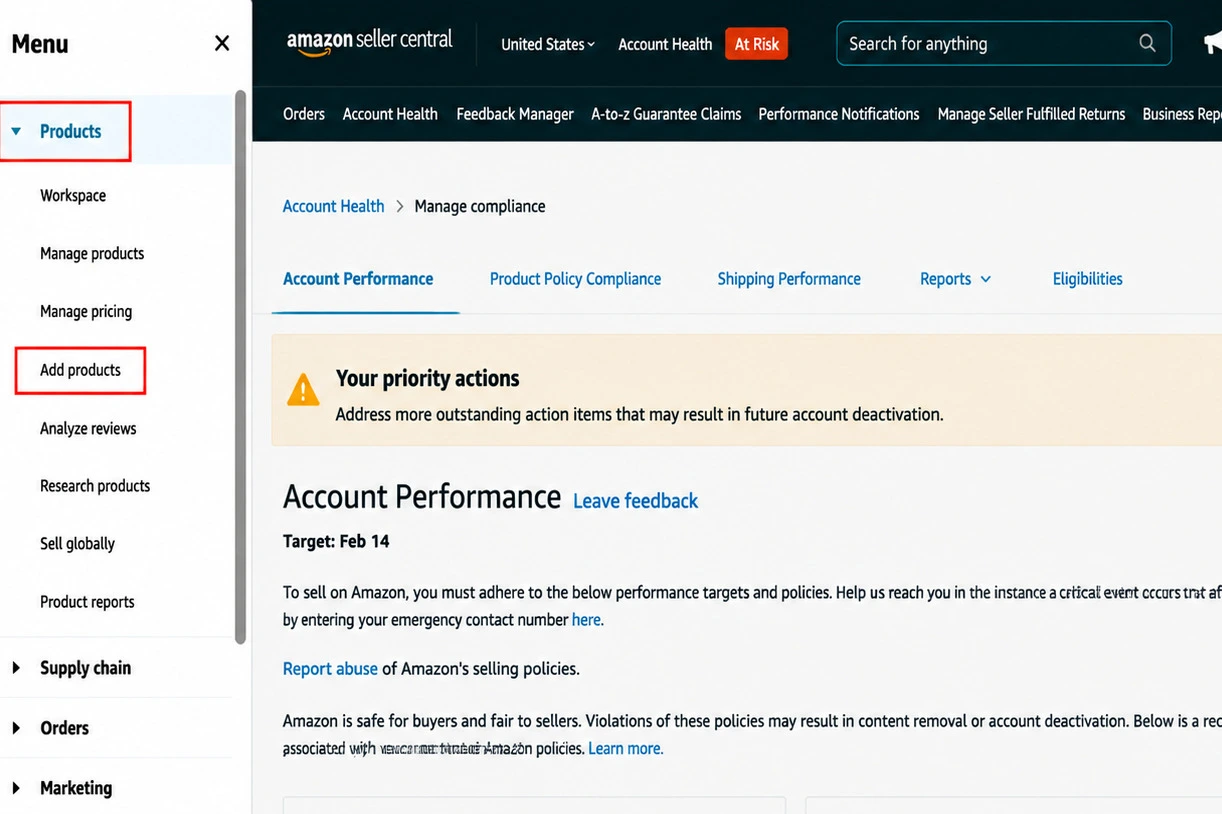
1. Log in to Seller Central and go to Products from the sidebar menu, then select Add products.
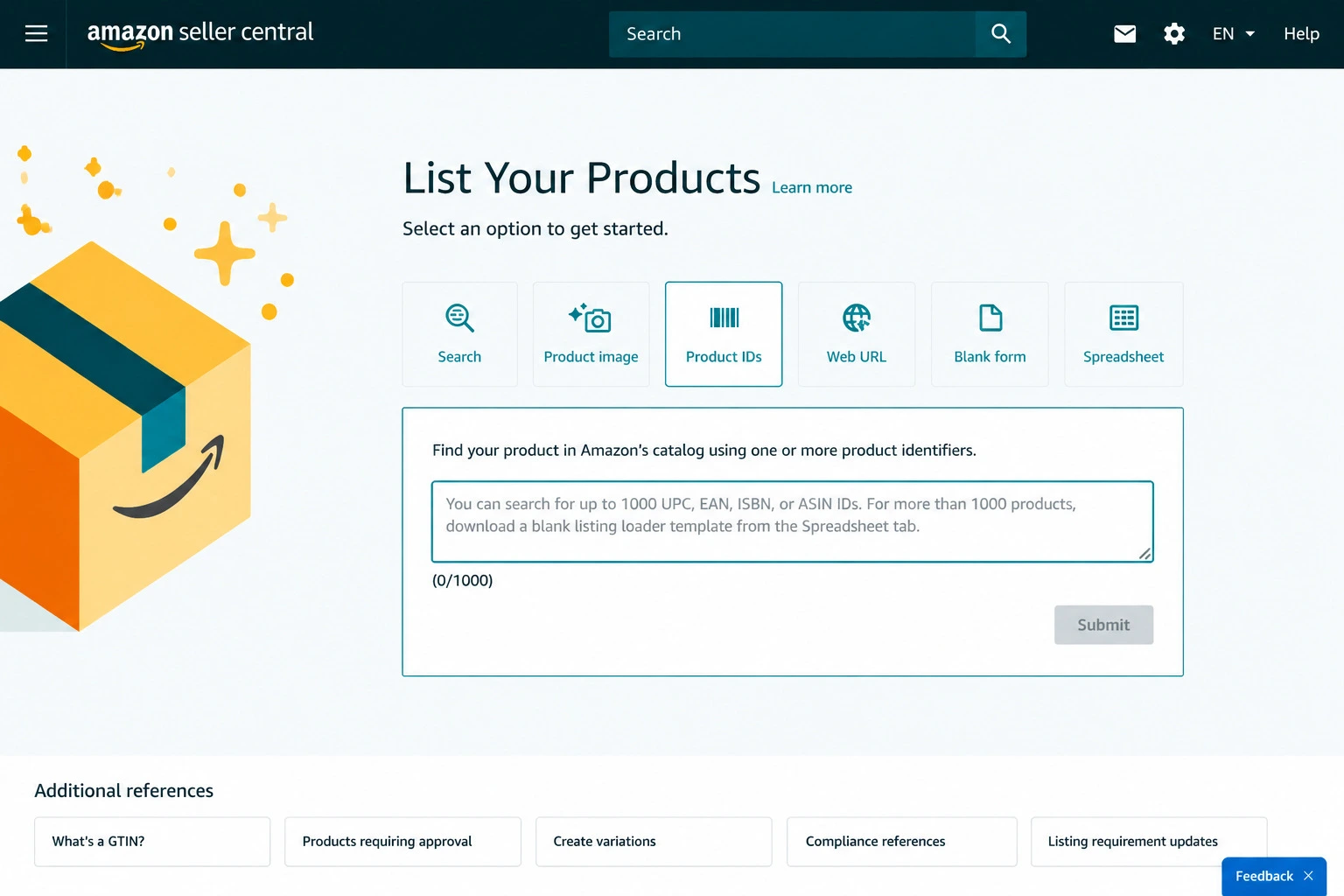
2. After clicking Add products, search for the item by ASIN, UPC, name, image, etc., and submit.
3. Read the button that appears. Apply to Sell or Show Limitations signals that you’ll need Amazon’s approval to list the product.
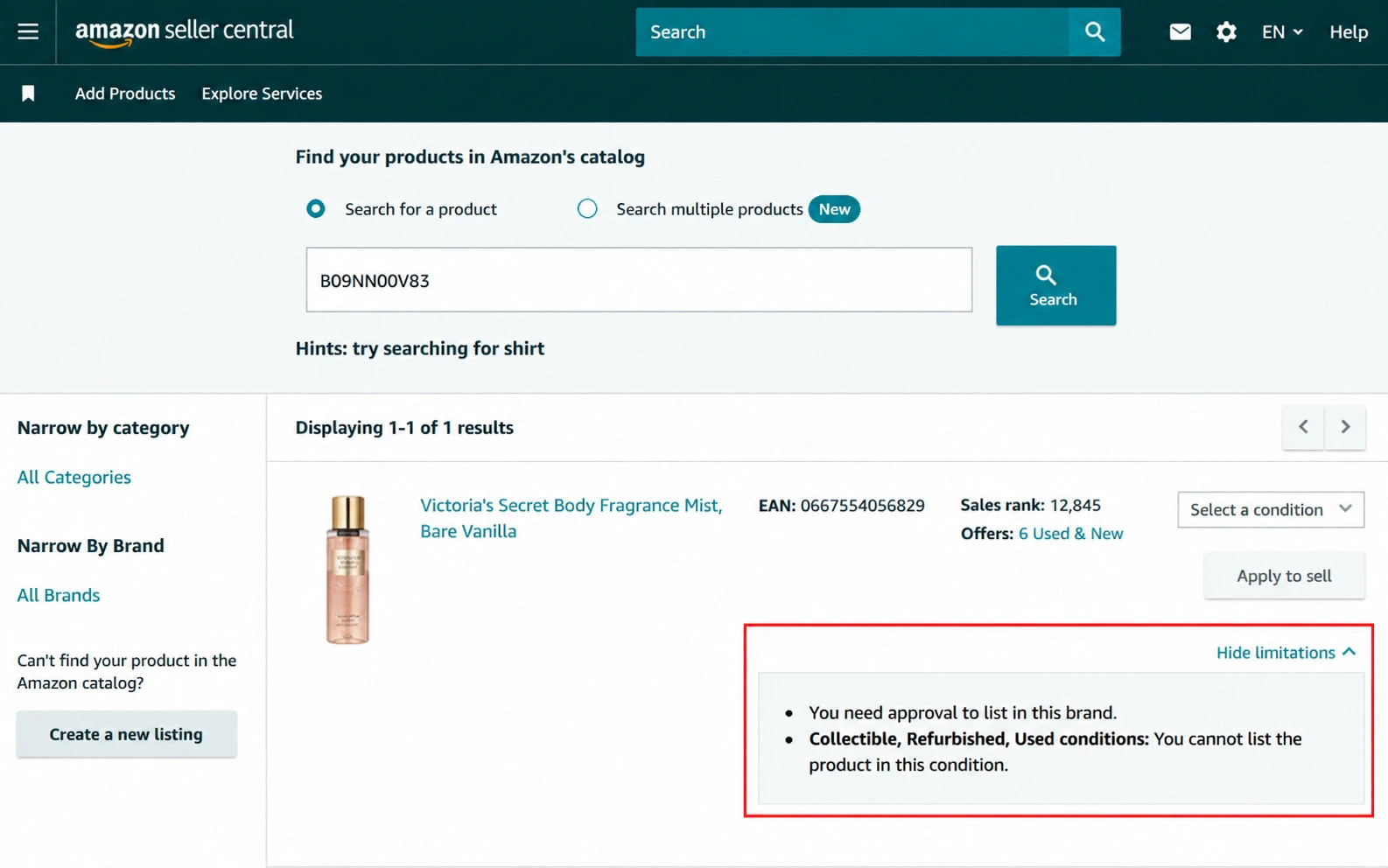
4. Even if the Sell Yours button appears, it doesn’t always mean the product is fully unrestricted, since brand-specific or listing-specific gates can still apply underneath a category that otherwise looks open. If in doubt, click through to the listing details before placing a purchase order.
5. For larger catalogs, use the Restricted Products Report in Seller Central’s Reports section to check status in bulk instead of searching item by item. This is the more practical route once you’re sourcing more than a handful of SKUs at a time, since checking each one manually doesn’t scale.
How Do You Sell Restricted Items on Amazon?
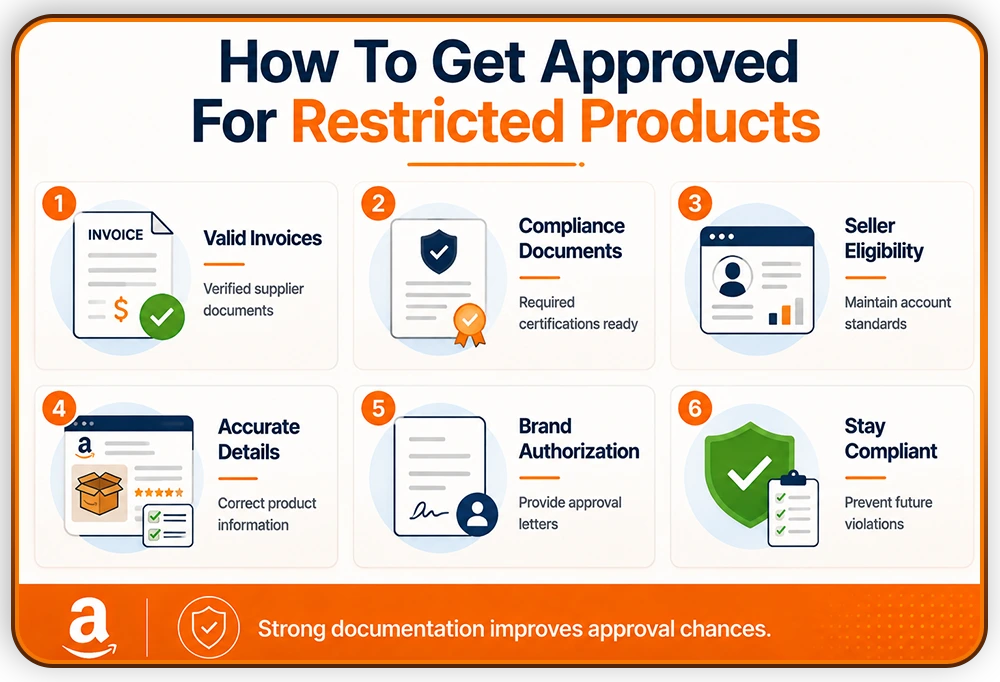
Click “Apply to Sell” from the product page and follow the application. Amazon typically asks for documentation such as invoices, supplier authorization letters, safety or compliance certifications, and product photos.
What Amazon actually wants to see is a clean, traceable supply chain. An invoice from a distributor you can’t verify, or one that doesn’t match the brand name on the packaging, is one of the more common reasons applications get denied on the first attempt. Before applying, it helps to confirm that your invoices show the correct supplier name, match the product’s brand and quantities, and come from a source Amazon can verify if it chooses to follow up.
Invoice requirements:
Generic invoices are one of the most common reasons applications stall. Amazon typically expects invoices that meet all of the following:
- Dated within the last 90 days of the application
- Typed, not handwritten
- Legible, with no missing or cut-off fields
- Showing your company's name and information exactly as it appears in your Seller Central account
- Showing the supplier's name, address, and contact information
- Itemizing the specific products and quantities purchased
An invoice that’s outdated, illegible, or shows a company name that doesn’t match your seller account is typically rejected without much explanation. Confirm all of this before submitting rather than treating the invoice as a formality.
Some categories have their own criteria beyond the standard documentation. A few examples include:
- Fine art: typically requires at least three years of experience selling art, plus proof of standing as a reputable dealer.
- Fine jewelry: commonly requires at least one year of Amazon selling history, $50,000 or more in annual revenue, a physical retail location, and an additional category fee.
- Brand and authenticity protection:categories with high counterfeit rates, watches and designer accessories among them, get extra scrutiny to protect both the brand owners and the buyers purchasing under that brand name.
- Wine: requires status as a licensed winery or a wholesaler with retail privileges. This is separate from, and stricter than, general alcohol restrictions.
These aren’t exhaustive, and requirements shift by category. Check the specific application page for the category you’re applying to rather than assuming the standard documentation list covers it.
Some applications auto-approve. Others go to manual review, and timelines vary by category, commonly cited in the range of one to four weeks as a general guide rather than a guarantee. Categories with a higher counterfeit or safety risk, such as supplements or automotive parts, tend to sit on the longer end of that range.
If the application process feels like more than you want to manage directly, particularly across multiple categories, third-party ungating services exist and specialize in this. They don’t have any special approval authority with Amazon and can’t guarantee an outcome, but they can help assemble documentation and avoid the more common rejection triggers. Treat them as a time-saver, not a shortcut around Amazon’s actual requirements.
Who Is Eligible to Apply for Restricted Product Approval?
Meeting these requirements doesn’t guarantee approval, but falling short of them means Amazon won’t seriously evaluate the application at all, and sellers who apply before checking are usually rejected for reasons that have nothing to do with the product itself.
- Professional Selling Plan: Restricted product approval isn't available to Individual sellers. You need a Professional plan, which runs $39.99 a month, before you can apply for any gated category.
- Performance metrics within Amazon's thresholds: Approval generally requires an order defect rate under 1%, a pre-fulfillment cancellation rate under 2.5%, and a late shipment rate under 4%. These are visible in the Account Health Dashboard, and Amazon checks them as part of the review.
- Selling history:New seller accounts are less likely to be approved for restricted categories. There's no fixed waiting period Amazon publishes, but building a track record in open categories first tends to improve approval odds later.
- A company website:Not a formal requirement in every category, but commonly requested as evidence that the seller is an established business rather than a one-off reseller.
Check these before applying, not after a rejection. A denial tied to account eligibility rather than the product itself still counts against your application history.
What Happens If You Sell a Restricted Product Without Approval?
Listing removal or suppression is the most common first consequence. The listing goes down, sometimes without much warning, and any active advertising tied to it typically stops as well. Inventory already sitting in FBA can be disposed of or returned at the seller’s cost, which adds a direct financial hit on top of the lost sales.
Amazon also tracks this at the account level. A restricted product violation shows up on the Account Health Dashboard under Policy Compliance, and a serious or repeated violation can move your Account Health Rating into the “At Risk” range, roughly 100 to 199 points. An account in that range is closer to deactivation than the seller may realize, since it often takes just one or two additional issues to cross the threshold Amazon uses for suspension.
Repeated or serious violations can escalate beyond the listing level to account-level enforcement. A single restricted-product mistake, corrected quickly, rarely threatens the account on its own. A pattern of them, or one tied to a customer safety complaint, is a different situation, and it’s the kind of pattern Amazon points to when it takes broader action. That risk connects directly to overall account health, and in more serious cases to an account suspension or Section 3 violation.
Final Thought
Restricted-product violations are one of the most preventable causes of Amazon account violations. However, when a listing removal escalates into an account suspension, resolving the issue requires more than simply removing the product. Sellers must identify the compliance failure, explain the root cause, provide supporting documentation, and show Amazon the corrective actions taken to prevent future violations.
If your account has been impacted by selling a restricted or prohibited product, Back to Selling can help you analyze the violation, develop an evidence-backed Plan of Action, and guide you through the reinstatement process to restore your selling privileges.

Frequently Asked Questions
Can you sell any product on Amazon?
No, Amazon sorts products into three tiers: open, which can be listed freely; restricted, which requires approval; and prohibited, which cannot be sold under any circumstances.
What’s the difference between restricted and prohibited products on Amazon?
Restricted products can be sold once Amazon approves an application and any required documentation. Prohibited products have no approval path at all, so no amount of documentation changes that status.
How long does Amazon take to approve a restricted product application?
Timelines vary by category. Some applications auto-approve almost immediately, while others go through manual review that commonly takes one to four weeks, though Amazon doesn’t publish a guaranteed timeframe.
Can a product be restricted in one Amazon marketplace but not another?
Yes, restriction status is set per marketplace, so a product approved for sale in one country’s Amazon store may still require a separate application in another.
Does getting approved for one restricted category approve me for others?
No, approval is generally specific to the category, subcategory, or brand you applied for. A separate application is needed for each additional restricted category you want to sell in.
3 Responses